.svg)
How to Create a Confidential Token on Solana

The blockchain ecosystem is powered by tokens, enabling users to exchange value without intermediaries, participate in governance votes, and more.
However, since public blockchains make all transaction details visible to everyone, actions like sending tokens to a friend, getting paid a salary in tokens, or using DeFi protocols currently reveal the transfer amount and the participants' balances to the entire onchain world. This lack of privacy is a significant barrier to widespread adoption and is a clear disadvantage when comparing the use of blockchains to the conventional financial system.
Inco is building a solution for onchain confidentiality. Currently live on Solana Devnet (in beta) and Base Sepolia testnet, Inco’s first product, Inco Lightning, offers developers a way to build confidential programs and smart contracts.
One key use case of Inco Lightning is creating confidential tokens. In this demo, that’s what we’re going to show you how to do.
What Is a Confidential Token?
The Confidential Inco SPL Token Program is a confidential token implementation on Solana that enables confidentiality-preserving token operations. Unlike traditional SPL tokens, where balances and transfer amounts are publicly visible onchain, the Inco Token Program uses encryption to keep these values hidden while still allowing mathematical operations on them. So they behave like normal tokens on the Solana blockchain and can be used in Solana applications, but transaction metadata such as transaction amount and balance stays confidential.
How To Create a Confidential Token
Creating a confidential SPL token is easy. All you’ll need are your standard development tools, including Rust, Solana CLI, and Anchor. We’re going to deploy the contract to Solana Devnet.
Quickstart
Prerequisites
Before you get started with the contract, you’ll need to set up the prerequisites.
We recommend installing nvm (Node Version Manager) first and then install Node.js with nvm.
- For Linux: The official Linux version can be found here, or you can follow this tutorial.
- For Windows, follow the Readme guide.
- For Mac, you can follow this tutorial.
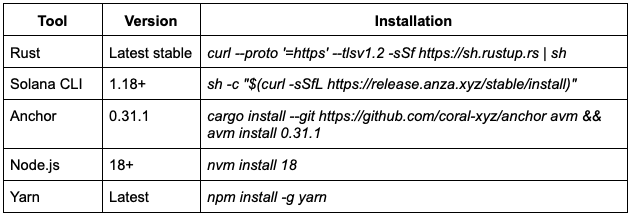
Configuring Solana for Devnet
# Set Solana to use devnet
solana config set --url devnet
# Verify configuration
solana config get
# Create a new wallet (if you don't have one)
solana-keygen new --outfile ~/.config/solana/id.json
# Get some devnet SOL for testing
solana airdrop 2
# Check your balance
solana balanceEnvironment Variables
Create a .env file in your project directory:
# Your Solana cluster
RPC_URL=https://api.devnet.solana.com
# Path to your wallet keypair
SOLANA_WALLET=~/.config/solana/id.jsonProject Setup
# Create your project
git clone https://github.com/Inco-fhevm/lightning-rod-solana
# Install dependencies
yarn install
# Build the programs
anchor buildConfiguring Anchor.toml File
[features]
resolution = true
skip-lint = false

[programs.devnet]
inco_token = "<your_program_id>"

[registry]
url = "https://api.apr.dev"

[provider]
cluster = "devnet"
wallet = "~/.config/solana/id.json"

[scripts]
test = "yarn run ts-mocha -p ./tsconfig.json -t 1000000 tests/**/*.ts"
It is worth noting that you only need to add your own program ID here. The Inco Lightning program ID is handled internally by the inco-lightning crate via the INCO_LIGHTNING_ID constant.
Configuring Cargo.toml for Confidential Token
[package]
name = "confidential-token"
version = "0.1.0"
description = "Confidential Token Program"
edition = "2021"

[lib]
crate-type = ["cdylib", "lib"]
name = "confidential_token"

[features]
default = []
cpi = ["no-entrypoint"]
no-entrypoint = []

[dependencies]
anchor-lang = { version = "0.31.1", features = ["init-if-needed"] }
anchor-spl = "0.31.1"
inco-lightning = { version = "0.1.4", features = ["cpi"] }
Building and Deployment
# Build all programs
anchor build

# Get your program ID
solana address -k target/deploy/confidential_token-keypair.json

# Update the program ID in Anchor.toml and lib.rs declare_id!()
# Then rebuild
anchor build

# Deploy to devnet
anchor deploy --provider.cluster devnet

# Verify deployment
solana program show <your-program-id>
After the deployment, don’t forget to update the declare_id! macro in your lib.rs with the actual deployed program ID.
Program Functions
Your confidential SPL token is compatible with these program functions.
Mint Operations
initialize_mint
Creates a new confidential token mint.
pub fn initialize_mint(
    ctx: Context<InitializeMint>,
    decimals: u8,                    // Token precision (e.g., 9)
    mint_authority: Pubkey,          // Authority to mint tokens
    freeze_authority: Option<Pubkey> // Authority to freeze accounts
) -> Result<()>
mint_to
Mints confidential tokens to an account using encrypted ciphertext.
pub fn mint_to(
    ctx: Context<IncoMintTo>,
    ciphertext: Vec<u8>,  // Encrypted amount
    input_type: u8        // Encryption type identifier
) -> Result<()>
mint_to_with_handle
Mints confidential tokens using an existing encrypted handle.
pub fn mint_to_with_handle(
    ctx: Context<IncoMintTo>,
    amount_handle: Euint128  // Pre-existing encrypted handle
) -> Result<()>
Account Operations
initialize_account
Creates a new confidential token account.
pub fn initialize_account(ctx: Context<InitializeAccount>) -> Result<()>
create
Creates an associated token account using PDA derivation.
pub fn create(ctx: Context<Create>) -> Result<()>
close_account
Closes a token account and reclaims the rent.
pub fn close_account(ctx: Context<CloseAccount>) -> Result<()>
Transfer Operations
transfer
Transfers confidential tokens between accounts using encrypted ciphertext.
/// remaining_accounts:
///   [0] source_allowance_account (mut) - PDA for source owner's new balance
///   [1] source_owner_address (readonly)
///   [2] dest_allowance_account (mut) - PDA for destination owner's new balance
///   [3] dest_owner_address (readonly)
pub fn transfer<'info>(
    ctx: Context<'_, '_, '_, 'info, IncoTransfer<'info>>,
    ciphertext: Vec<u8>,  // Encrypted transfer amount
    input_type: u8        // Encryption type identifier
) -> Result<()>
Burn Operations
burn
/// remaining_accounts:
///   [0] allowance_account (mut) - PDA for granting decrypt access to owner
///   [1] owner_address (readonly)
pub fn burn<'info>(
    ctx: Context<'_, '_, '_, 'info, IncoBurn<'info>>,
    ciphertext: Vec<u8>,  // Encrypted burn amount
    input_type: u8        // Encryption type identifier
) -> Result<()>
Also you can find the complete implementation of the confidential token program on our Github.
Running Tests
If you want to test your deployed program, all you need to do is simply running the test command:
# Build the program
anchor build

# Run tests on devnet
anchor test --provider.cluster devnet
Next.js Template
If you want to go further and build confidential Solana dApps, there is a very easy way of doing so. We have built a quickstart starter template that helps developers build a frontend for confidential Solana applications using the Inco Solana SDK and Solana wallet adapters.
Prerequisites
Before you begin, make sure you have:
- Node.js 18+ installed
- A Solana wallet (Phantom, Solflare, etc.)
- Some devnet SOL for testing
If you don’t have any Devnet SOL, you can get some from the Solana Faucet, or simply run the command below in your terminal:
solana airdrop 2
# Clone the template
git clone https://github.com/Inco-fhevm/nextjs-template-svm.git
cd nextjs-template-svm

# Install dependencies
npm install
# or
yarn install
# or
bun install

# Start the development server
npm run dev
# or: yarn dev / bun run dev
After running the “npm run dev” or “yarn dev” command, open http://localhost:3000 on your browser to see your app.
Conclusion: How Easy Was That?
By this point you’ll have your confidential token program in production on Solana Devnet, enabling users to transact confidentially, and you’ll also have an understanding of the program logic. It’s important to note that this is far from the only use case possible with a confidential program: theoretically, you could build any blockchain application you can think of.
Want to go further building with Inco? Check out the documentation, schedule a call with the Inco dev rel team, and join the Inco Discord and check out the dev-chat channel.
Incoming newsletter
Stay informed with the latest developments in onchain confidentiality.
.png)